IArsenal Web
The command post
for your employees.
A web page reserved for your company, built for the business owner: you direct your AI employees, share your know-how with your team, and connect your Google and Microsoft accounts.
- IArsenal Web is ready with no installation on your part.
- Works with your Claude account.
- More than 50 connectors, set up step by step.
IArsenal Web vs a regular Claude
IArsenal Web,
not just an app.
With a regular Claude, the app, you talk to Claude from your device. With IArsenal Web, Claude works in your own space, on day and night: it has its folders, its tools and its schedule, and it keeps going when you close your computer.
A regular Claude (the app)
- You talk to it from your computer, your phone or the web.
- Its work runs on your device or at Anthropic.
IArsenal Web
-
Yours alone, hosted in Quebec
Each person has their own dedicated IArsenal Web, hosted by OVHcloud in Beauharnois, Quebec, Canada.
-
It works even with your computer off
Routines run in IArsenal Web, on schedule. Closing the tab or shutting down your computer stops nothing, and a restart doesn't cut any work in progress.
-
Your folders stay put
Your files live in IArsenal Web, in your folder closed to others. Claude finds them from one conversation to the next; you browse, open and edit them in the page.
-
A real computer at its service
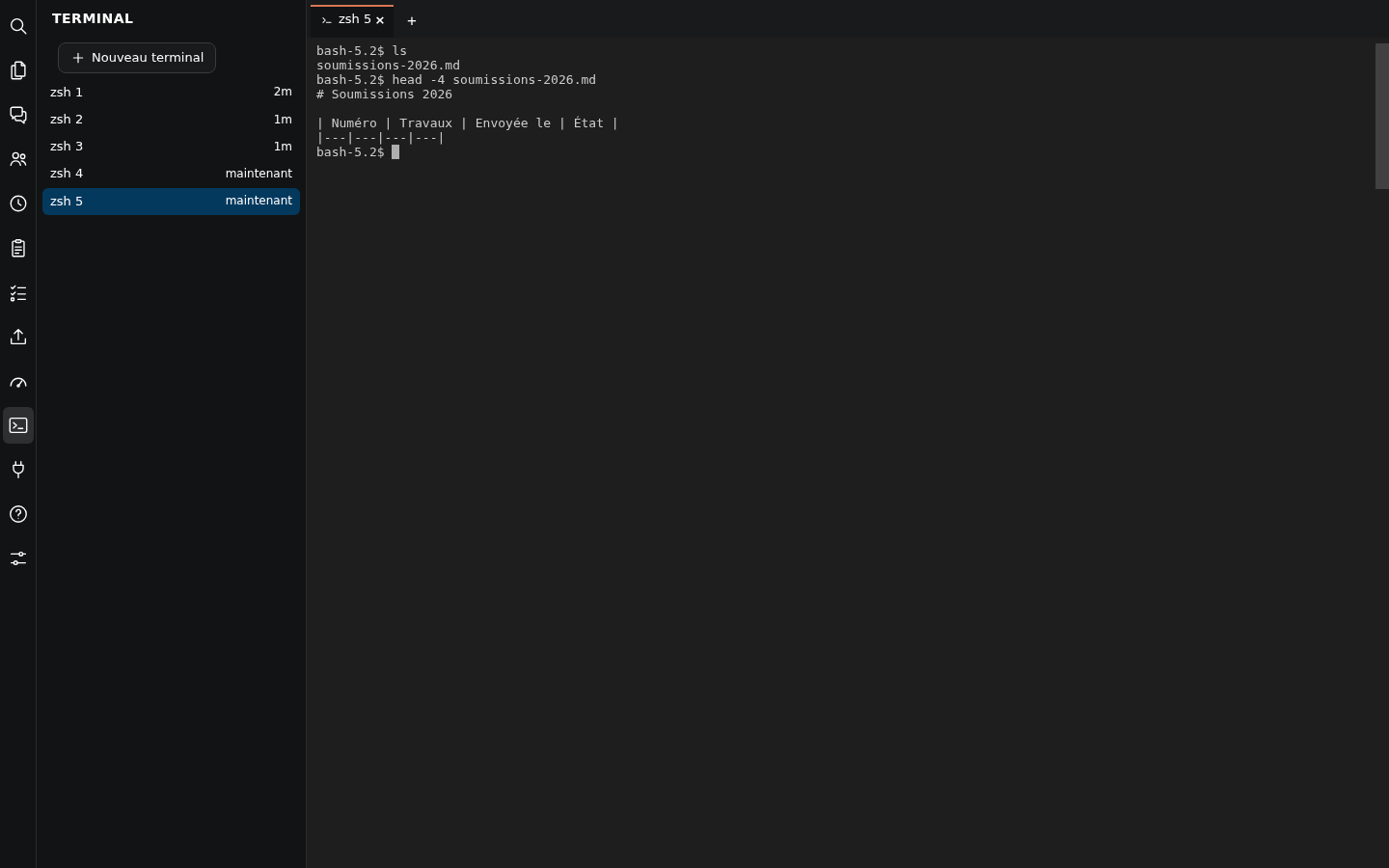
A real terminal in the page: Claude can run commands, process files and prepare documents right in IArsenal Web.
-
The same space everywhere
Open the same page on your computer or your phone: same conversations, same files, same work in progress.
-
Your keys in your vault
Access to your Google, Microsoft and other accounts is kept in the IArsenal Web vault, never displayed nor passed through a conversation.
-
Maintained for you
Updates run at night, without cutting any work, with a return to the previous version if needed. A local AI model can also handle small jobs.
Everything it can do in IArsenal Web
Precise schedules
Each routine follows a cron schedule: by the minute, the hour, a day of the month, a day of the week. A report every Monday at 7 a.m., a follow-up every Wednesday at 9 a.m., a check every 15 minutes.
SSH access to your machines
From the IArsenal Web terminal, Claude connects over SSH to your servers and computers, with your own keys, kept secure. It checks, installs and fixes for you.
All your files
Browse, open, edit, rename, move, download, right in the page. Your sensitive folders, such as your SSH keys and secrets, are never displayed.
The LLM of your choice
On top of Claude: OpenAI, Gemini, Mistral, Groq, DeepSeek, Grok, OpenRouter, Hugging Face and more by API key, or your own OpenAI-compatible model, local or hosted, chosen function by function.
A real terminal
A full shell in the page. Claude runs scripts, processes data and prepares documents there; the terminal keeps going even with the tab closed.
More than 50 connectors
Google, Microsoft 365, QuickBooks, Stripe, HubSpot, Slack, Cloudflare, GitHub and many more, set up step by step, with keys in the IArsenal Web vault.
Already at work for us, every day
We run our own companies with IArsenal Web. Here is what is running right now, with nobody behind the screen. These are examples of what your AI employees can do for you.
The inbox sorts itself
Every incoming email is labelled, archived or highlighted, and the sorting learns from your own corrections.
The bank flows into the books
Bank statements are fetched every day, and recognized lines are categorized and posted in QuickBooks.
Supplier bills get entered
A bill received by email becomes a bill to pay in QuickBooks, with no data entry.
From work order to invoice sent
A completed work order becomes a purchase order, then an invoice sent to the client, automatically.
Scanned documents file themselves
A document dropped in the “To file” folder is read, renamed and filed in the right place.
Emails become tasks
A starred quote or service request becomes a dated task in Google Tasks.
Payroll gets gathered
Pay stubs and withholding reports received by email are collected and filed.
Domains are watched
Domain transfers, DNS and certificates are checked continuously, and fixed when needed.
Backups run at night
Equipment configuration files and work folders are backed up every night, read-only.
Built for the business owner
You set the direction.
Your AI employees do the work.
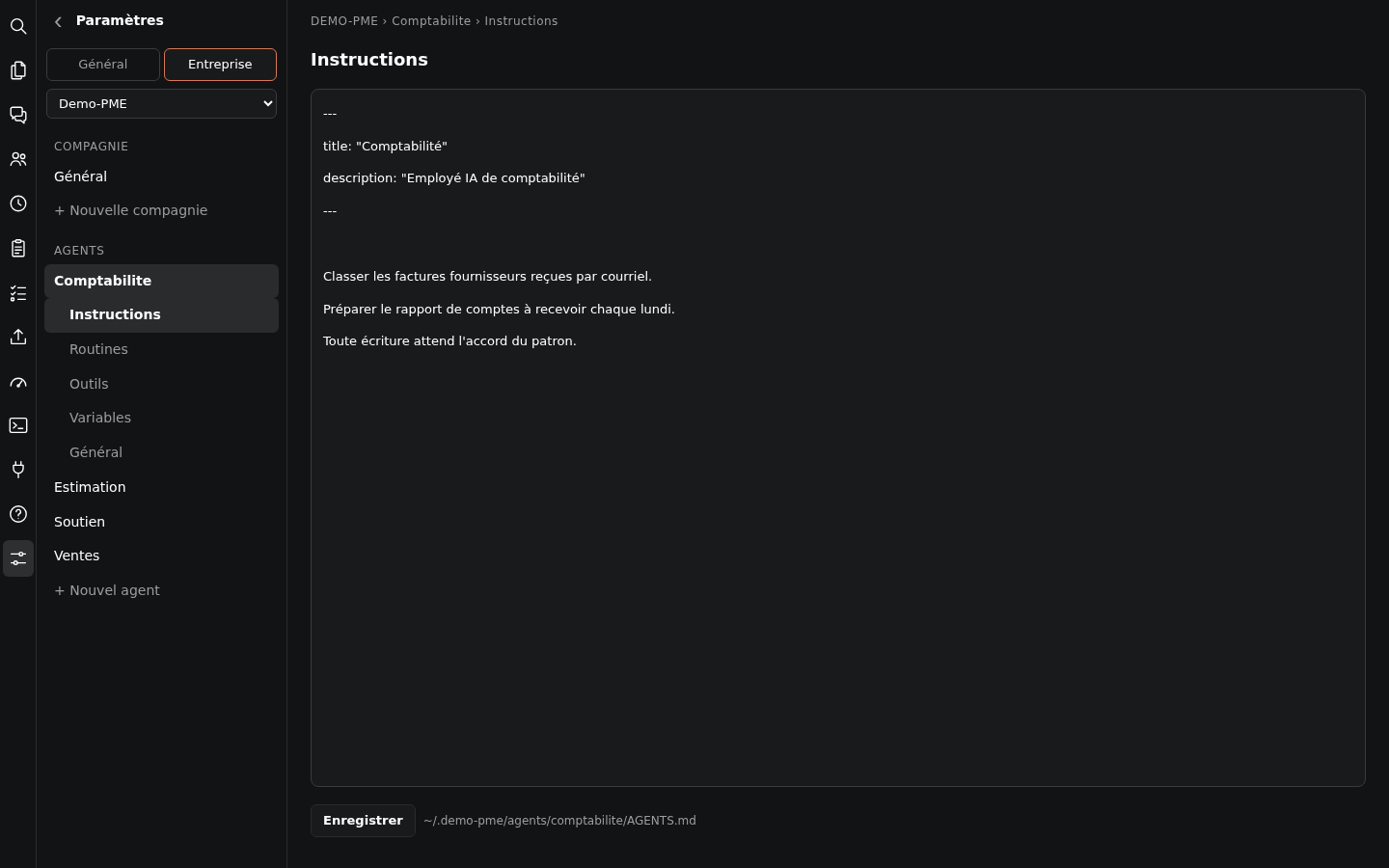
Each company has its AI employees. Each one has its instructions, its recurring tasks and its tools. You stay in charge of what matters.
A team of AI employees per company
Accounting, sales, support: each AI employee has its own instructions, routines and tools. You create and edit them from the page, no command line.
Routines that run on their own
An AI employee runs a task on a schedule or on demand. One button runs it now, one switch turns it on or off.
Nothing important without your approval
In Plan mode, the AI employee prepares a plan that waits for your approval. Before a sensitive action, a Yes / No card asks for your permission.
Several files at once
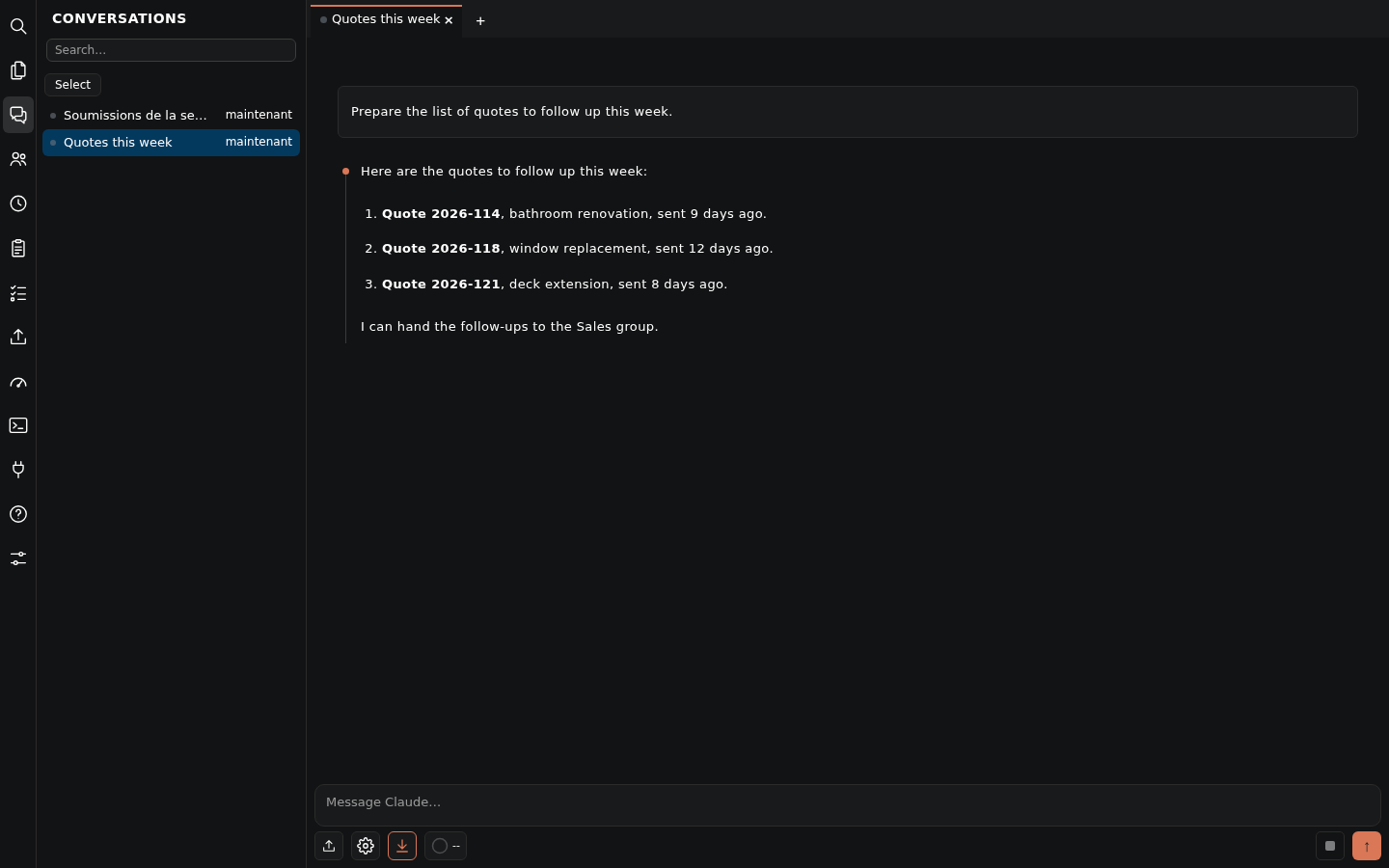
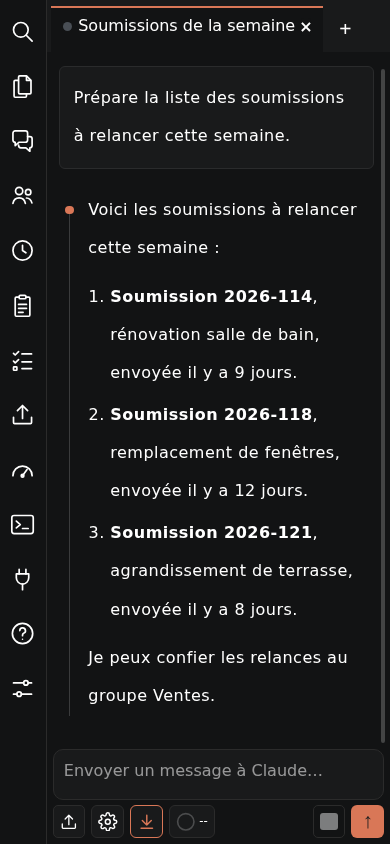
One conversation per tab, several at the same time. A dot shows who is working, who is waiting for your answer and what you haven't read yet. You can write while it works.
Usage, in plain sight
What is left of your plan, and usage per AI employee, per conversation and per hour, over 1, 7 or 30 days.
Everything is easy to find
Search the text of every conversation and land on the right message. Paste a screenshot or attach a file right in the conversation.
For your staff too
It's not just
for the owner.
Each employee has their own space and their own assistant. The company's know-how is at hand, tasks are clear, and everyday work goes faster.
Their own space
Each employee has their own space in IArsenal Web, with a folder closed to others and their own sign-in. What is theirs stays theirs.
The company's know-how, at hand
The AI employees, work methods and memories the owner shares arrive directly on the employee's side, always up to date. No more hunting for who knows how to do what.
Clear tasks
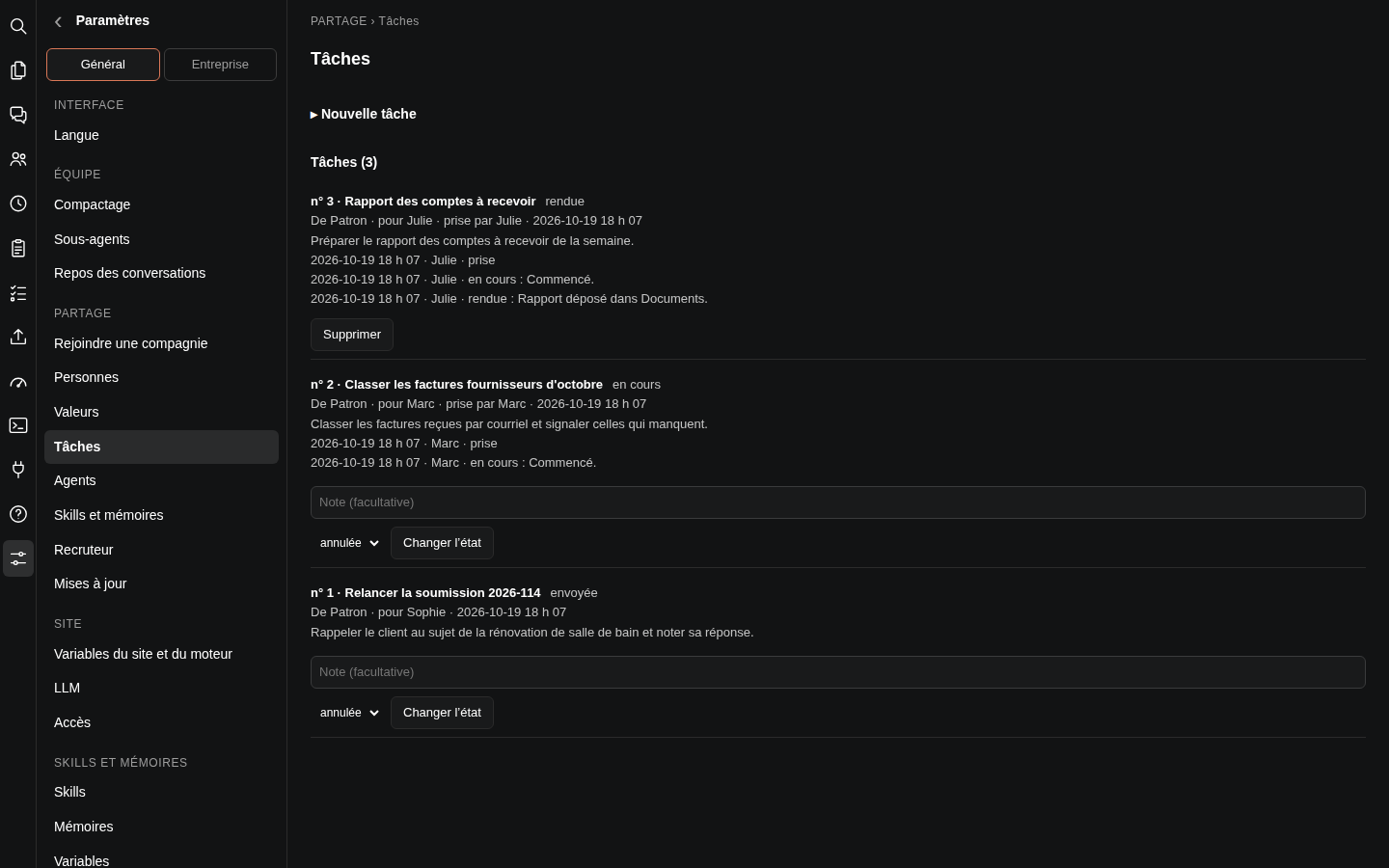
Each task says what is expected and for whom. The employee takes it, adds notes and delivers it; everyone sees where it stands.
Their voice counts
An employee can propose a change to the company's information. The owner accepts it, and the whole team benefits.
Their tools, connected
Google or Microsoft mail, calendar and files, connected by the company, are available to their assistant. With Microsoft 365, some actions are done in their own name.
An assistant by their side
Several files open at once, a plan to approve before important steps, and the same page on their phone.
Knowledge sharing
Your know-how,
shared with the whole team.
What you taught your AI employees doesn't stay on your computer. You share it with your staff, by group, and you control every version.
- 01
The employee joins the company
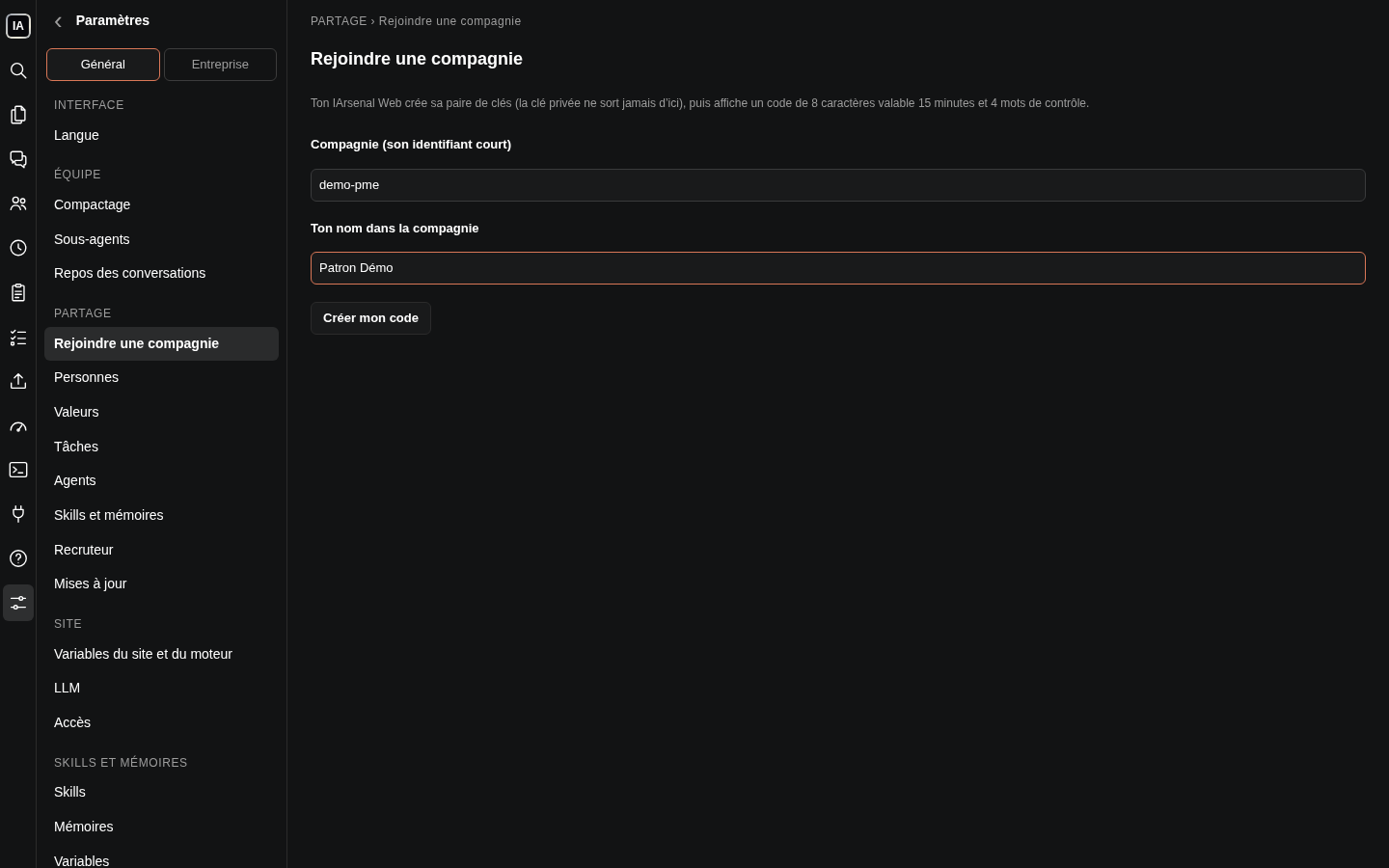
Their computer creates its own key pair and shows an 8-character code, valid for 15 minutes, and 4 check words. You confirm the same 4 words on your side.
- 02
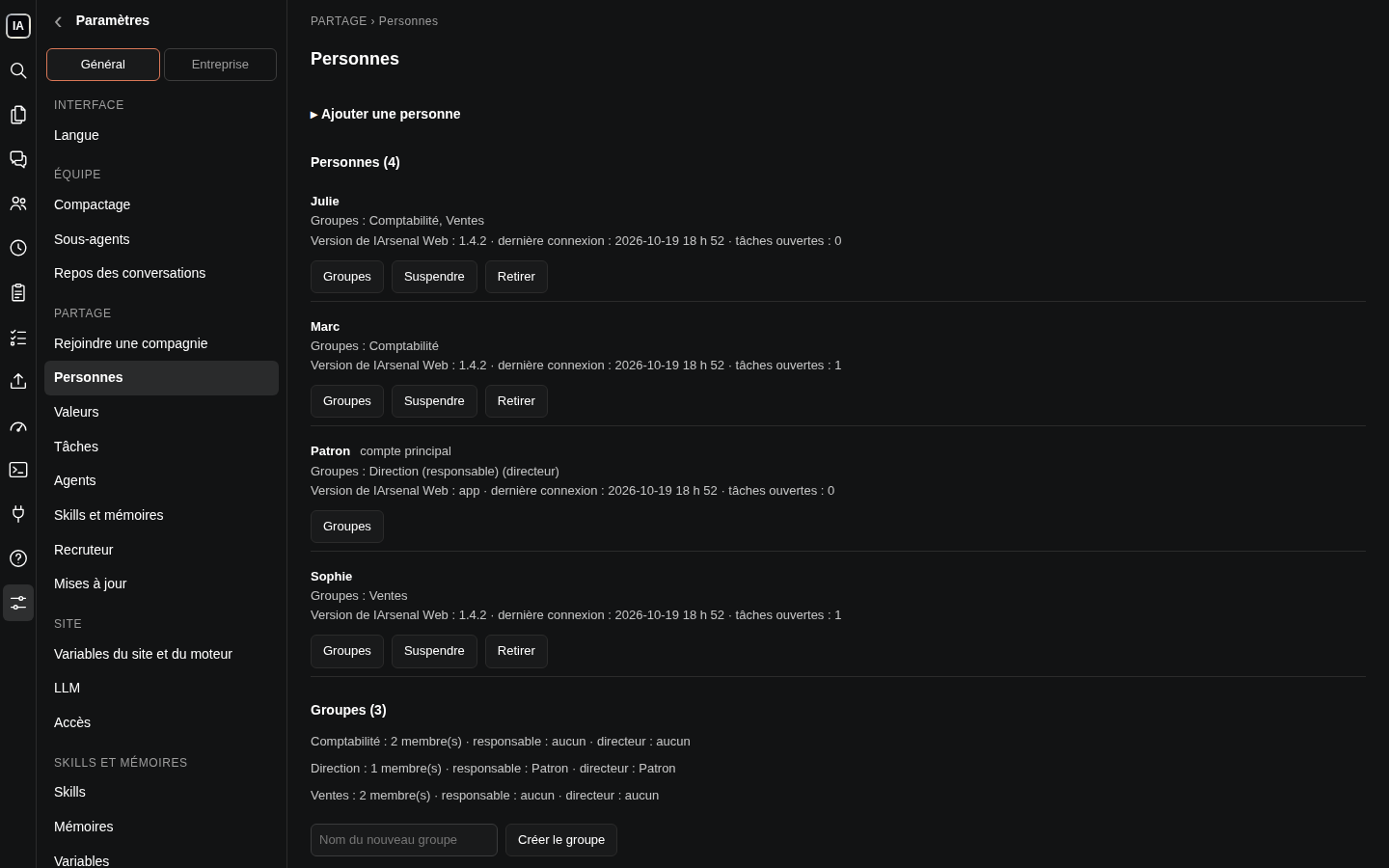
People and groups
You place each person in groups. You can suspend, restore or remove them at any time.
- 03
Company values
You choose which company information each group can read or edit. Staff proposals wait for your acceptance.
- 04
AI employees, methods and memories
You share an AI employee, a work method or a memory with a group. Your staff receive it read-only, checked every time it loads.
- 05
Tracked tasks
You write a task for a person or a group: the first available person takes it. You see its status: sent, taken, in progress, delivered, blocked.
- 06
Updates in waves
Each new version is signed on your computer, sent first to a pilot group, then to everyone. A wave can be stopped, and rolled back.
Security between staff and owner
Everyone sees what they should.
Nothing more.
Sharing goes through a single path, protected on both ends. What you send arrives intact, and what an employee receives, they can't quietly change.
A certificate on each side
Every connection between computers presents a certificate signed by your company's authority. A removed or suspended person no longer gets through.
4 check words at pairing
If a key were swapped along the way, the 4 words would no longer match. After 5 failed attempts, pairing locks for 15 minutes.
Read-only for staff
AI employees, methods and memories received are placed outside the employee's folder. A file edited by hand is rejected.
A quarantined review
You can have an employee's AI employees reviewed. The reviewer has no commands, no write access, no network and no access to secrets. Its fixes apply only if the file hasn't changed, with a copy of the previous version.
A check before any sharing
Everything that goes out to sharing first passes a leak check. At the slightest problem, nothing leaves.
Keys are never displayed
Your connector keys go straight into the IArsenal Web vault. They never go through a conversation and never come back to the screen.
A protected sign-in
Password, with an optional 6-digit code. Protection against repeated attempts. Without credentials, the page stays closed.
One IArsenal Web per person
Each person has their own dedicated IArsenal Web: their account, a folder closed to others, their share of memory and their own firewall.
Connectors
Your Google and Microsoft accounts,
connected in a few steps.
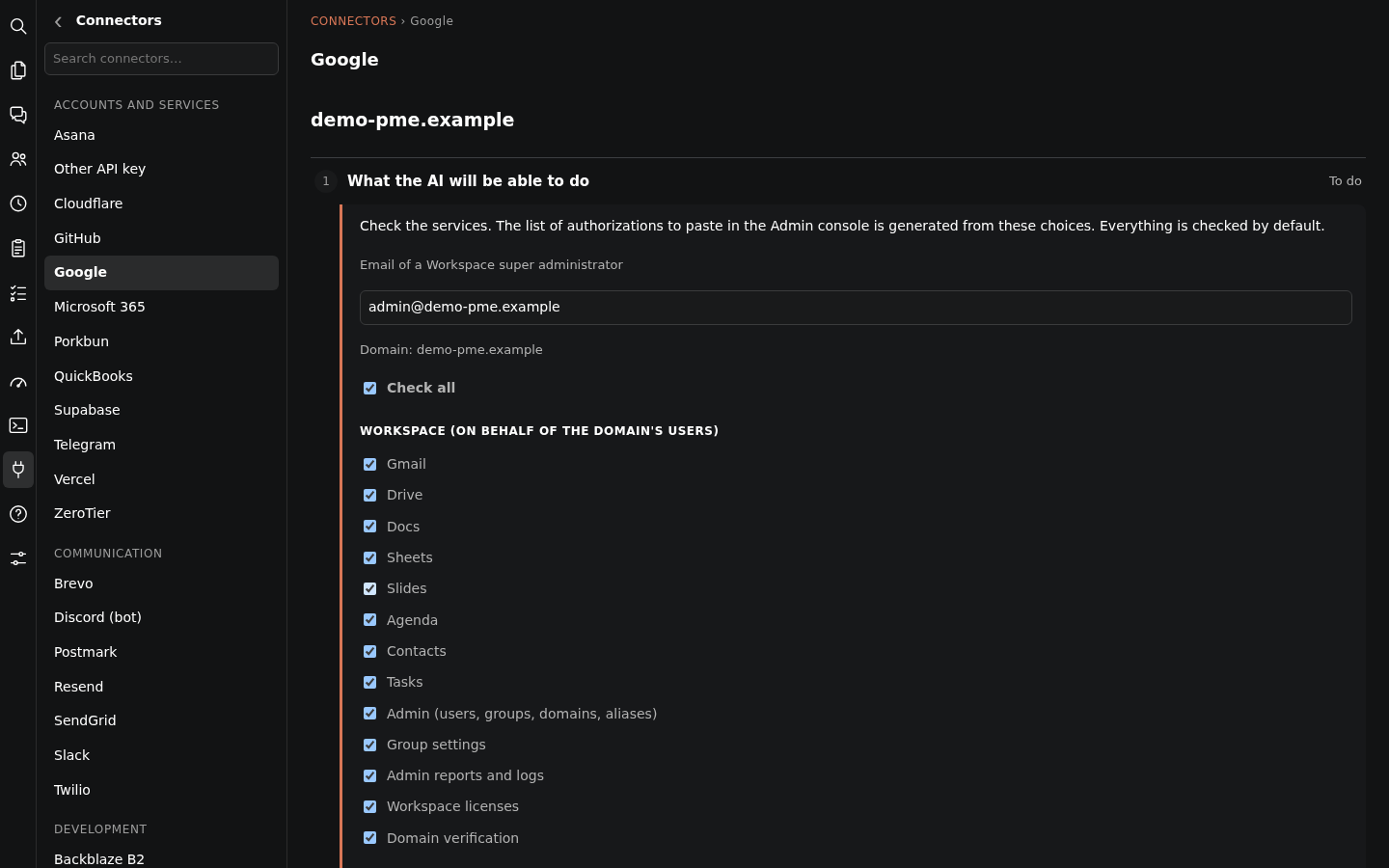
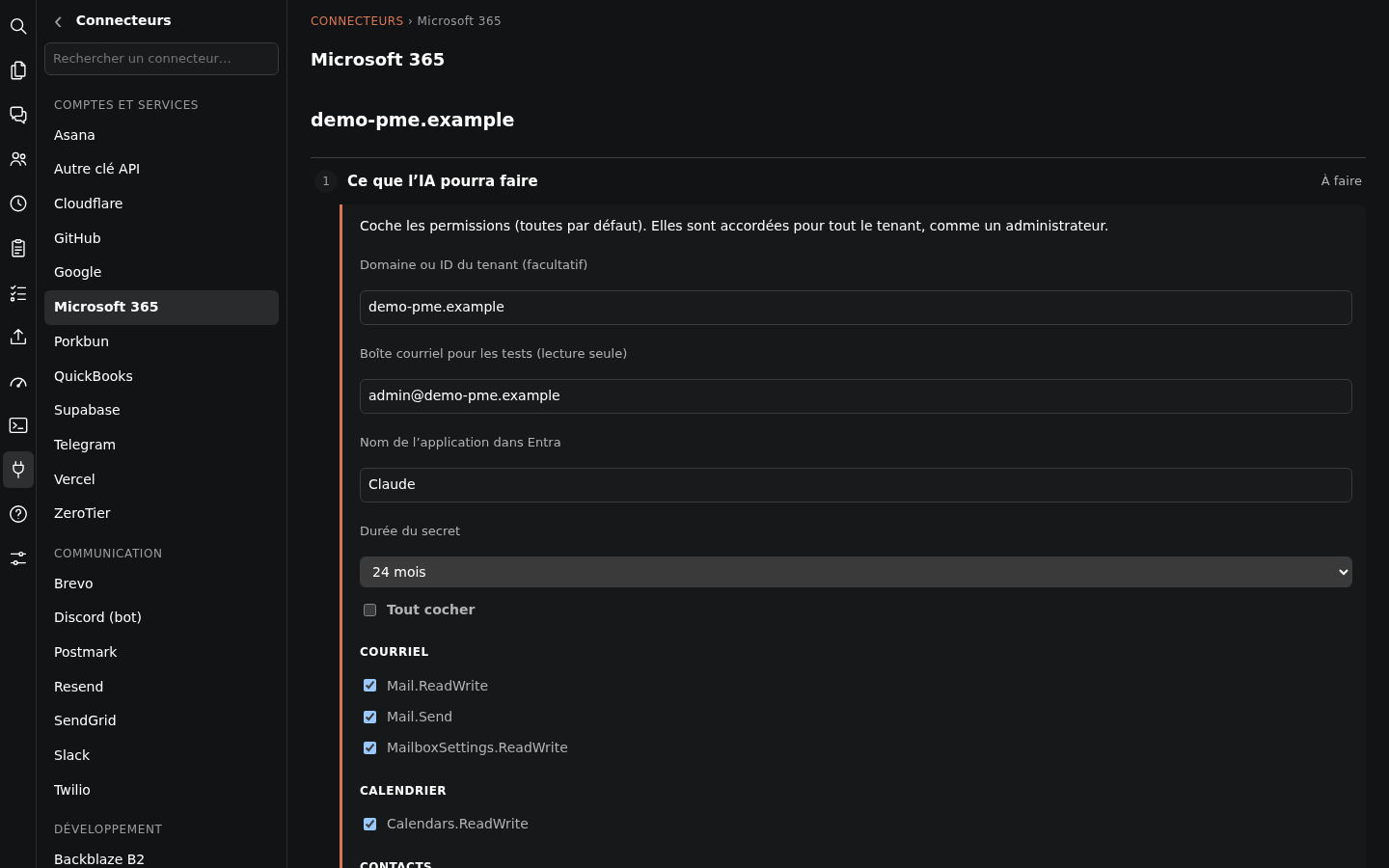
A step-by-step assistant guides you, and each step is checked before moving on. You tick what the AI will be allowed to do. A check runs every night.
Google Workspace
Gmail, Drive, Docs, Sheets, Slides, Calendar, Contacts and Tasks. For the administrator: users, groups and licences. For marketing: Analytics, Tag Manager, Search Console, Google Ads and your Business Profile.
Microsoft 365
Mail, calendar, contacts, OneDrive and SharePoint, Planner and To Do, and reading Teams. Permissions are chosen one by one.
And more than 50 connectors in all
Accounting and payments
- QuickBooks Online
- Stripe
- Square
Sales and projects
- HubSpot
- Pipedrive
- Asana
- Trello
- monday.com
- Notion
- Jira and Confluence
- Todoist
Communication
- Slack
- Telegram
- Twilio
- Brevo
- SendGrid
Web and domains
- Cloudflare
- GitHub
- Porkbun
Missing a service? An API key of your choice can be connected too.
What's different
Designed for a company,
not for one person alone.
-
Ready for you
IArsenal Web is reserved for your company, with one space per person. It is ready with no installation on your part.
-
The owner's know-how, shared and protected
You decide what each group receives. Your staff use it without being able to change it.
-
Security between computers
Pairing by code and 4 words, certificates on both ends, quarantined review.
-
Connectors set up for you
A step-by-step assistant for each account. Keys stay in the IArsenal Web vault.
-
Works with your Claude account
Your conversations are processed by Claude, from Anthropic, with your own Claude account. Your files, your AI employees and your settings stay in your IArsenal Web.
And everything else
Every tool,
in a single page.
Terminal
A real terminal in the page. Closing the tab doesn't stop it.
Files and editor
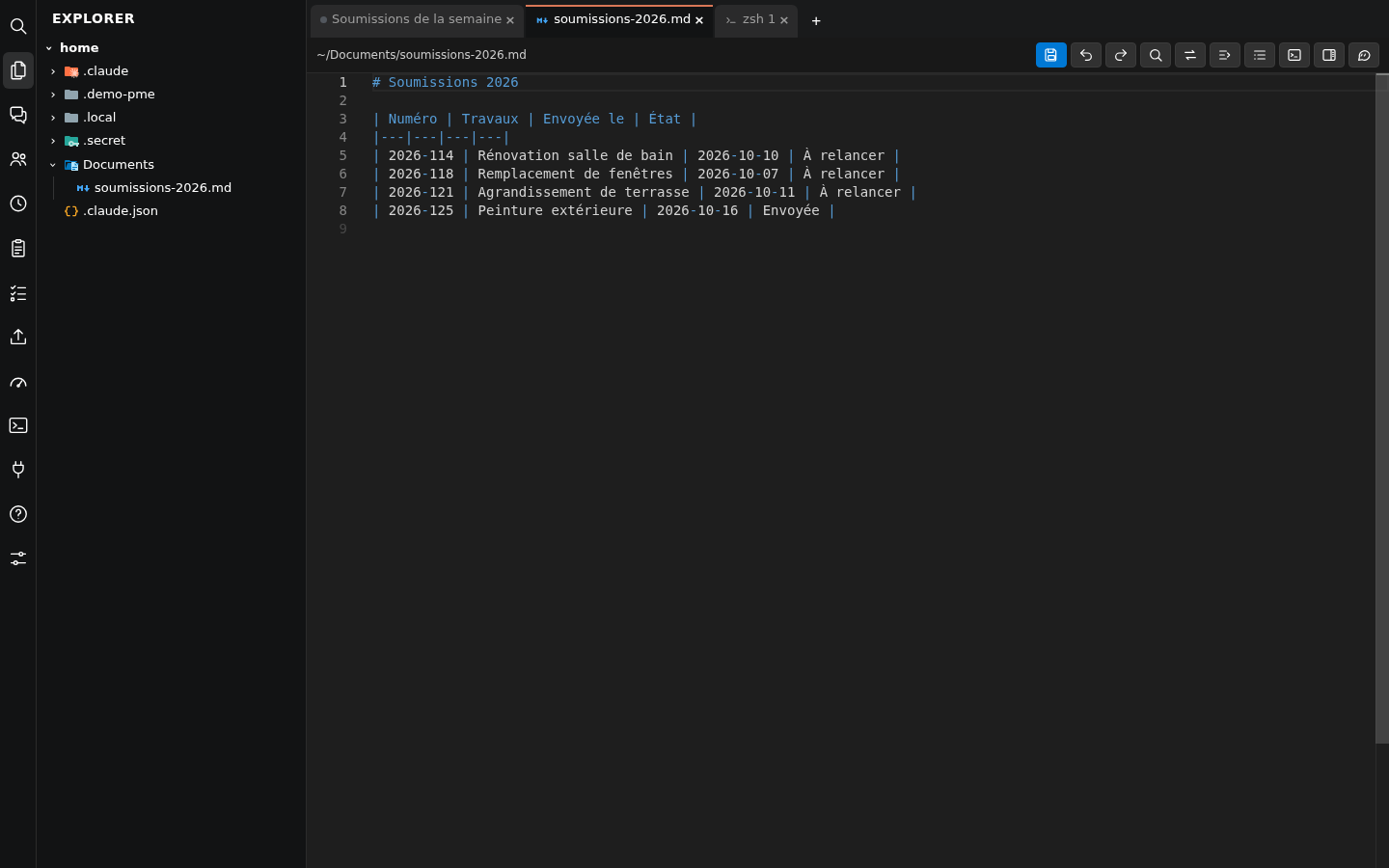
Browse, rename, move, download. A file opens in a tab, next to the conversation.
On your phone
Full-screen panel on a phone. Installs on the home screen like an app.
French, English, Spanish
The interface and the answers in the language you choose.
No interruptions
An IArsenal Web restart doesn't cut any work in progress.
Overnight updates
Updates run at night, without cutting any work, with a return to the previous version if needed.
Conversation memory
A gauge shows the room left. The conversation summarizes itself, automatically or on request.
A local model as backup
A local AI model can handle small jobs, like naming conversations.
Built-in help
A help page, by topic, right inside IArsenal Web.
All features
Everything is there, in a single page.
Conversations
- One conversation per tab, several at once, organized in tab groups
- Write while it works, or stop it right away if it heads the wrong way
- Choose the model, faster or more powerful, the thinking level and the permission mode
- See its thinking, its task list and what it hands to its helpers
- Plans to review, fix, accept or decline, and to print
- Questions and permissions settled in one click
- Search across every conversation and file
- Rename, compact, delete with a trash bin
AI employees
- Create an AI employee in a few clicks, per company
- Its instructions, like a job description
- Its tools, its know-how and its own settings
- Scheduled routines: create, pause, run now, see the last run
- Read and fix what it knows how to do and what it remembers
Files
- File explorer and editor in the page
- Terminal in the browser, nothing to install
- Attach a file or a screenshot to a message
- See and delete uploaded files
Connections
- Google: a personal account, or the whole company at once
- Microsoft 365: the whole company, or a personal account (Outlook, OneDrive)
- The Microsoft app created for you, without the Azure console
- QuickBooks, Cloudflare and more than 40 services by key
- Status of each connection, checked every night or on demand
- Another AI model, local or external, for some functions
Account and comfort
- Your Claude subscription, with no extra API fees, or an API key
- Password, 6-digit code, trusted device
- Text size, captions, panel width, language
- Built-in help, and Claude helping you on the page, screenshot included
- New version announced and installed in one click
Sign up
Sign your company up
for IArsenal Web.
IArsenal Web is ready with no installation on your part. You connect your Claude account, connect your Google or Microsoft accounts, and your AI employees get to work.
A question before sign-up opens? Call or write to us.